Skip to content

KRAMVIA TECHNOLOGIES

Move your business forward.
Bring your records
with you.

Pharmacy operations, accounting and audit review — together in Kramvia ERP.

Planning an ERP switch? Start with a reviewed migration of supported records. Keeping your current ERP? Kramvia Ledger is our standalone accounting tool, being built around your financial exports and bank statements.

OUR SOFTWARE

Two products.
Built around the work.

ERP brings operations, accounting and audit review together. Ledger offers a standalone accounting route when you want to keep your existing ERP.

Kramvia

ERP

Controlled pilot enquiries

Move your records.
Connect the whole workflow.

A local-first ERP for Indian pharmacy distributors and wholesalers, with a reviewed migration path, transaction-linked accounting and permissioned audit review. Agree your supported migration and pilot scope before switching.

  • Reviewed legacy imports and opening-balance checks
  • Batch-aware purchases, stock, expiry and billing
  • Accounting entries linked to transactions and settlements
  • Audit history and controlled financial corrections
Explore Kramvia ERP
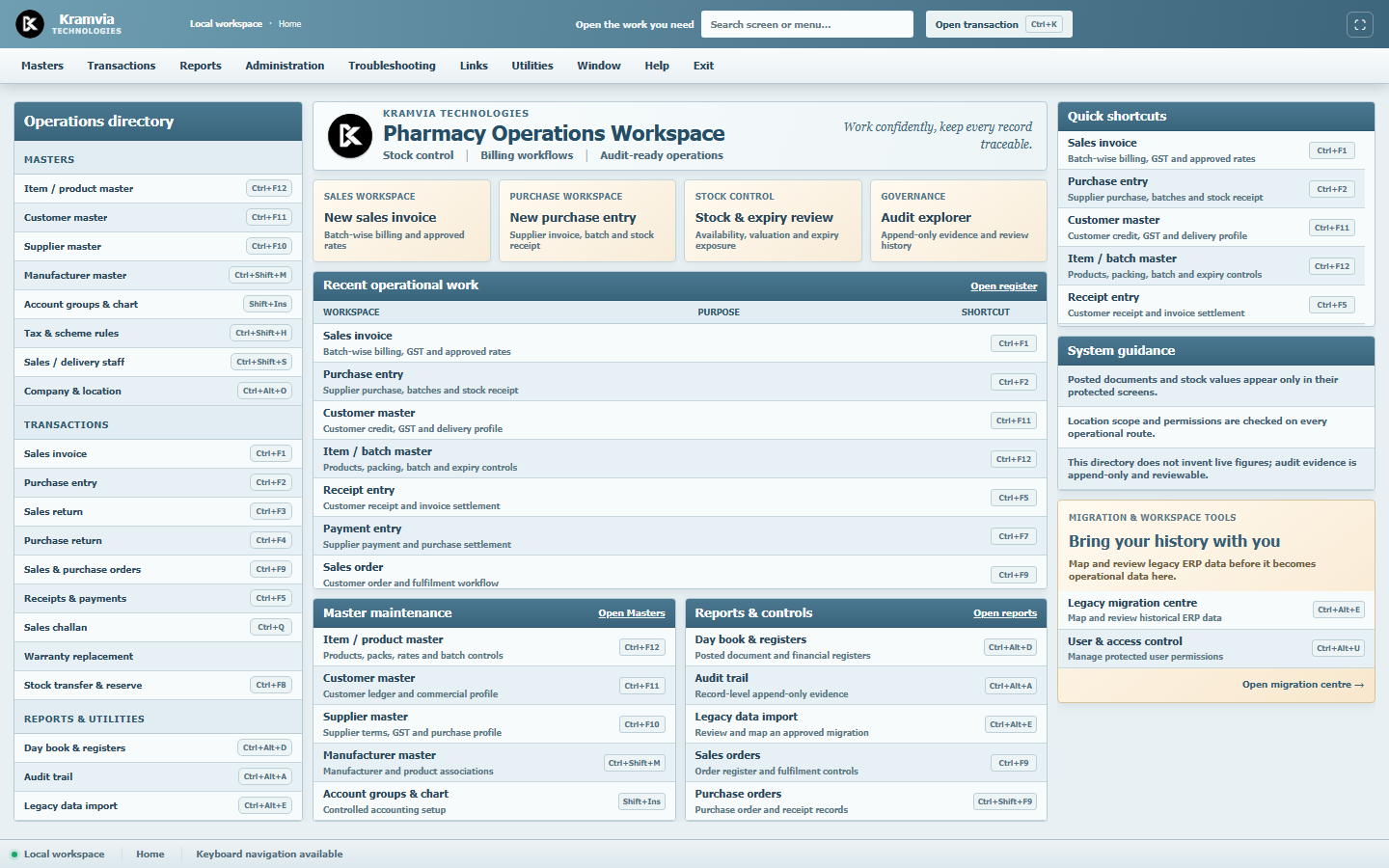
THE ERP WORKSPACEProduct screenshot
Kramvia ERP workspace showing operational directories, stock control and billing workflows.
Built for detailed, everyday work.Request a walkthrough
Kramvia

Ledger

In development

Keep your ERP.
Clarify your accounts.

A standalone accounting workspace for businesses keeping their current ERP. Bring supported financial exports and bank statements into a side-by-side review, with source context behind each reconciliation decision.

Explore the Ledger workflow
01
Prepare your ledgers

Map exported columns, review dates and amounts, and identify records that need attention.

02
Bring in bank statements

Work with the relevant account and switch statements while keeping the same ledger in context.

03
Reconcile with context

Review suggested or manual matches and account for amounts already allocated elsewhere.

04
Review the decisions

Keep track of exceptions and source records. Broader accounting and reporting workflows are being developed.

STOCK & EXPIRY

Know what is available. Understand what needs attention.

Stock is more than a quantity. A useful operational view connects each product with its batch, expiry, location and commercial context, so a team can investigate the right records before acting.

Explore stock & expiry management

Receive with the right detail

Capture batch identifiers, quantities and expiry dates alongside the purchase record. Confirm how packs and units are represented before comparing stock.

Review exposure before taking action

Separate available stock from batches approaching expiry. Check the underlying movements and supplier terms before deciding on a return or adjustment.

Keep changes traceable

Link stock questions to purchases, sales and returns. Agree which controls are supported in the ERP pilot before adopting the workflow.

BANK RECONCILIATION

One ledger. Every bank account in context.

Ledger is being developed around a side-by-side review of financial records and bank statements. The aim is to make matching understandable, including partial payments, timing differences and transactions spread across several accounts.

Explore the reconciliation workflow

Start with reviewed source records

Map dates, references and debit or credit fields, then inspect the interpretation before matching. A different export layout should not silently change what an amount means.

Switch accounts without losing the ledger

Review another statement against the same ledger. Amounts already allocated must remain accounted for across all banks, preventing a completed item from being matched twice.

Leave differences visible

A fee, missing receipt or date difference needs investigation, not a forced match. Keep unresolved balances and the evidence behind decisions available for review.

A CLEARER PATH FROM YOUR OLD ERP

Bring the records your business already depends on.

Switching should begin with understanding your existing data. Kramvia’s reviewed migration workflow maps supported exports, flags records needing attention and checks the opening position before you start new transactions.

Explore the migration process

Map once. Review before applying.

Use saved field mappings for supported exports. Review duplicates, invalid rows and matches to existing records before approving the import.

Carry forward a checked starting point.

Review manufacturers, products, parties, opening stock and party balances. Retain supported legacy references and compare stock and financial totals before cutover.

Know the scope before you switch.

The current adapter covers defined EasySol CSV imports. Other systems and historical transactions require separate compatibility checks. Keep your old records available during the agreed transition.

ACCOUNTING IS PART OF THE ERP

From the transaction to its financial trail.

Purchases, sales and settlements should be understandable as both business activity and accounting records. Kramvia ERP’s implemented core links these workflows with journal entries, party balances and permissioned audit review.

Explore accounting & audit controls

Connected accounting records

Review the accounting effect of supported operational postings and settlements in the ERP. You do not need to adopt standalone Ledger just to obtain the ERP’s accounting core.

Corrections with a reason and a trail

Supported financial corrections retain the original record, with approval rules and separate correcting entries. Audit review helps explain changes and the people behind them.

Clear boundaries around what is ready

The accounting core and audit explorer are implemented within the defined scope. Broader financial statements, GST returns and integrated bank reconciliation remain under development; an audit trail supports, rather than replaces, professional review.

BUILT FOR YOUR BUSINESS

Same industry.
Different working days.

The people moving stock and the people closing the books need different views of the business. Start with yours.

Pharma distributors

Balance purchasing, batch availability, billing and collections across a busy operational day.

  • Purchase receipt and batch detail
  • Sales and stock context
  • Customer and supplier balances
Explore operational workflows

Pharma wholesalers

Keep commercial terms, stock movements and outstanding records understandable as transaction volumes grow.

  • Product and commercial context
  • Batch and expiry review
  • Financial record preparation
Find the right product

Accounting teams

Start with existing records, investigate differences and keep supporting context close to the reconciliation.

  • Ledger and statement mapping
  • Multiple bank-account context
  • Exceptions and review decisions
Explore financial workflows

EXPLORE BY WORKFLOW

Start with the task
that needs attention.

Understand where each product fits, from receiving goods to reviewing financial records.

Read the complete workflow guide

FIND YOUR STARTING POINT

ERP or Ledger?

Switch your operating system with ERP, or keep it and use Ledger for financial work. ERP already includes an accounting core; Ledger is a standalone choice.

How Kramvia ERP and Kramvia Ledger differ
What matters to youKramvia ERPOperations + accounting + audit reviewKramvia LedgerStandalone accounting without an ERP switch
Primary focusPharmacy operations with linked accounting and audit reviewStandalone financial imports, reconciliation and accounting development
Starting pointA reviewed move from your existing ERP, or a new operational setupKeep your ERP and work with its supported financial exports
Designed aroundDistributors and wholesalers running operational and financial workAccounting and financial review tasks
Existing systemsSupported legacy masters, stock and opening-balance migrationExport mapping; replacing your ERP is not required
Current accessControlled pilot discussionsDevelopment and validation

Core accounting is part of ERP; Ledger is not a required add-on for it. Broader reports and GST filing remain under development. Automatic data sharing between the two products is not currently available.

Read the full product guide

A CONSIDERED START

Better software starts
with understanding
your business.

Read the getting started guide
01

Tell us how you work

Describe your business, your current software and the operational or financial tasks that need improvement.

02

Check the fit

Identify the relevant product, supported workflows, data requirements and implementation boundaries.

03

Agree the scope

For a pilot, establish what will be used, how it will be reviewed and what remains outside the agreed scope.

BEFORE YOU GET STARTED

Bring the context.
Protect the sensitive details.

A useful first discussion does not require your live business data.

Understand your exports

Note the software that creates your files, available export formats, column headings and the date range involved.

Useful for: ERP migration and Ledger imports

Map the working day

List the steps from purchase receipt to billing, stock review and settlement. Identify where delays or repeat entry occur.

Useful for: ERP workflow discussions

Start with safe examples

Use fictional examples or describe the format. Do not send patient records, bank statements or passwords through the enquiry form.

Read our Privacy Policy
Read the data preparation guide

THE COMPANY BEHIND THE PRODUCTS

Focused on the details.
Building for the long run.

Kramvia Technologies is building software for the operational and financial needs of pharmacy businesses in India. Our starting point is specific: understand the workflows, organise the records and make the work easier to follow.

ERP and Ledger approach that goal from different directions. ERP connects pharmacy operations with accounting and audit review. Ledger gives businesses that keep their existing ERP a separate route to financial imports, reconciliation and accounting work.

Get to know Kramvia
01

Specific over generic

Build around pharmacy workflows and the details that make them different.

02

Clarity over complexity

Make the next action and its supporting records easier to understand.

WHERE WE ARE TODAY

Built carefully.
Introduced deliberately.

Kramvia ERP — controlled pilot enquiries. Supported migration, operational, accounting and audit-review scope are agreed before use. Broader accounting statements, GST returns and bank reconciliation integration still require completion.

Kramvia Ledger — in development. Reconciliation, accounting and reporting capabilities are being built and validated before production access.

No automatic ERP–Ledger integration, direct GST filing availability or universal file-format support is implied.

Understand current availability

QUESTIONS, ANSWERED

A little clarity
before we talk.

Products, data, availability and getting started.

Read the product questions guide
Can you migrate data from our old ERP?

Our current reviewed migration path supports defined EasySol CSV exports for manufacturers, products, customers and suppliers, opening stock and party opening balances. We map fields, review duplicate and invalid rows, and reconcile the agreed opening position before cutover. Other ERP formats and historical transactions need separate support confirmation.

Do we need Ledger to get accounting inside ERP?

No. ERP includes a transaction-linked accounting core and audit-review controls. Ledger is a separate accounting product for teams that want to retain their current ERP, not a required accounting add-on. Broader reporting and filing capabilities are still being developed.

Is Kramvia a company or a product?

Kramvia Technologies is the company. Kramvia ERP and Kramvia Ledger are separate products being developed for operational and financial work in pharmacy businesses.

Which product should we start with?

Choose ERP when you want to move your pharmacy operations into Kramvia with accounting and audit review built in. Choose Ledger when you want a standalone accounting workspace while keeping your current ERP. Ledger begins with supported financial exports and bank statements; we confirm scope before use.

Do we need to replace our existing ERP to use Ledger?

Ledger is being built around imported records, so replacing your operational system is not the intended requirement. We must first confirm that your exported formats can be mapped and validated correctly.

Are the products ready for unrestricted business use?

No. ERP discussions are for a controlled pilot with an agreed workflow and implementation scope. Ledger is still under development and validation. Neither this website nor an enquiry grants production access.

Can Ledger handle different ledger and statement formats?

The approach is to map different source formats into a consistent internal structure, preview the interpretation and flag exceptions. Exact compatibility must be checked against sample exports; we do not claim support for every file format.

Will ERP and Ledger automatically exchange data?

They do not currently share an automatic integration. A future connection would require explicit permissions, tested mappings and checks against duplicate records.

What about GST filing and Profit & Loss reports?

ERP has an implemented transaction-accounting core, but broader financial statements, GST returns and bank reconciliation integration remain unfinished. Ledger’s broader accounting reports and direct GST filing are also under development. Availability depends on validated workflows and the required integrations and authorisation.

How do we discuss a pilot or our requirements?

Use the existing enquiry form to describe your business and the workflow you want to improve. Please send ordinary business contact information only, without patient records, bank statements, passwords or other sensitive information.

LET’S TALK ABOUT YOUR BUSINESS

Where should better software
make a difference for you?

Start with your workflow. We’ll start by listening.

Discuss your requirements